
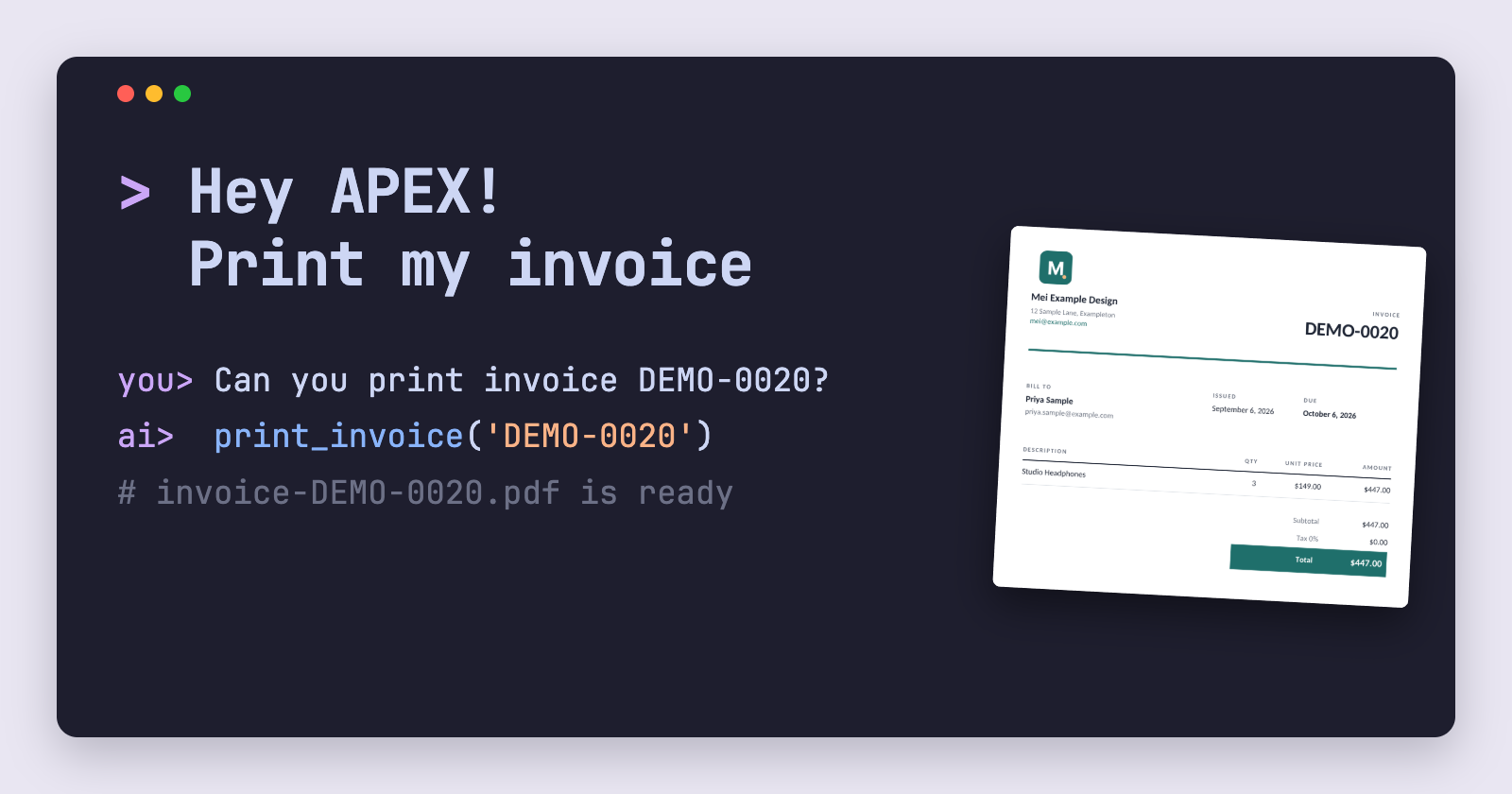
Hey APEX! Print my invoice
How to integrate ETCH with Oracle APEX and AI Agent tool calls to generate PDFs in a chat window
Recent versions of Oracle APEX let you define AI Agents in Shared Components and give them tools they can call. A tool is something the AI model can ask APEX to execute for it which could be running a SQL query, running some PL/SQL, or anything else you can imagine. I wanted to see how to leverage that with something people ask for all the time, which is "can I have that as a PDF?".
So I gave the ETCH example Orders app from my APEX install post an Invoice Assistant. You ask it about invoices in plain English, and when you ask it to print one, it generates the PDF with ETCH and gives you a link to download it.
To be clear, for this demo at least, when I say "print" I mean it in the sense of "give me a PDF" rather than sending it to a printer directly (although that is possible!).
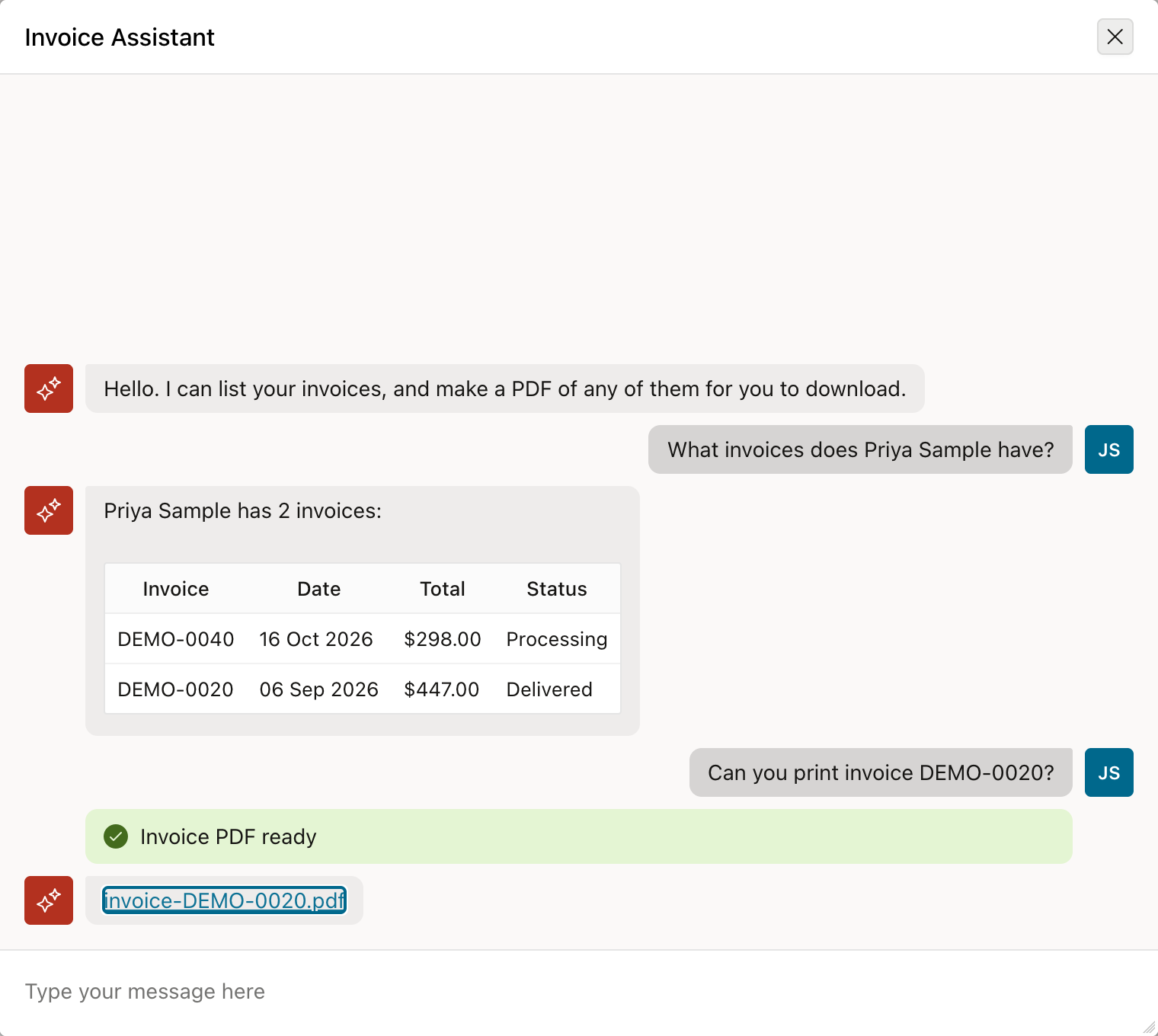
FYI I'm using a local model on my laptop for this demo, so the order data never leaves my machine since the DB is also running in a Docker on my laptop. Any service that speaks the OpenAI chat API and supports tool calls should work the same way (e.g. Claude, OpenAI etc).
What you need
- An APEX version that supports AI Agents and tools (I'm using APEX 26.1)
- ETCH installed in the schema, as in the install post. I only use its PL/SQL package and the Web Credential that holds the API key, not the plugins.
- A model that can call tools. Mine is a small Qwen model served on port 8000 with an OpenAI-style API.
- Something to print. The Orders app has an
ORDERStable and aPRODUCTStable, and each order is one product, so each invoice has one line.
The AI service
We need to create an AI Service that the Agent will use. In Workspace Utilities, open Generative AI Services and create one.
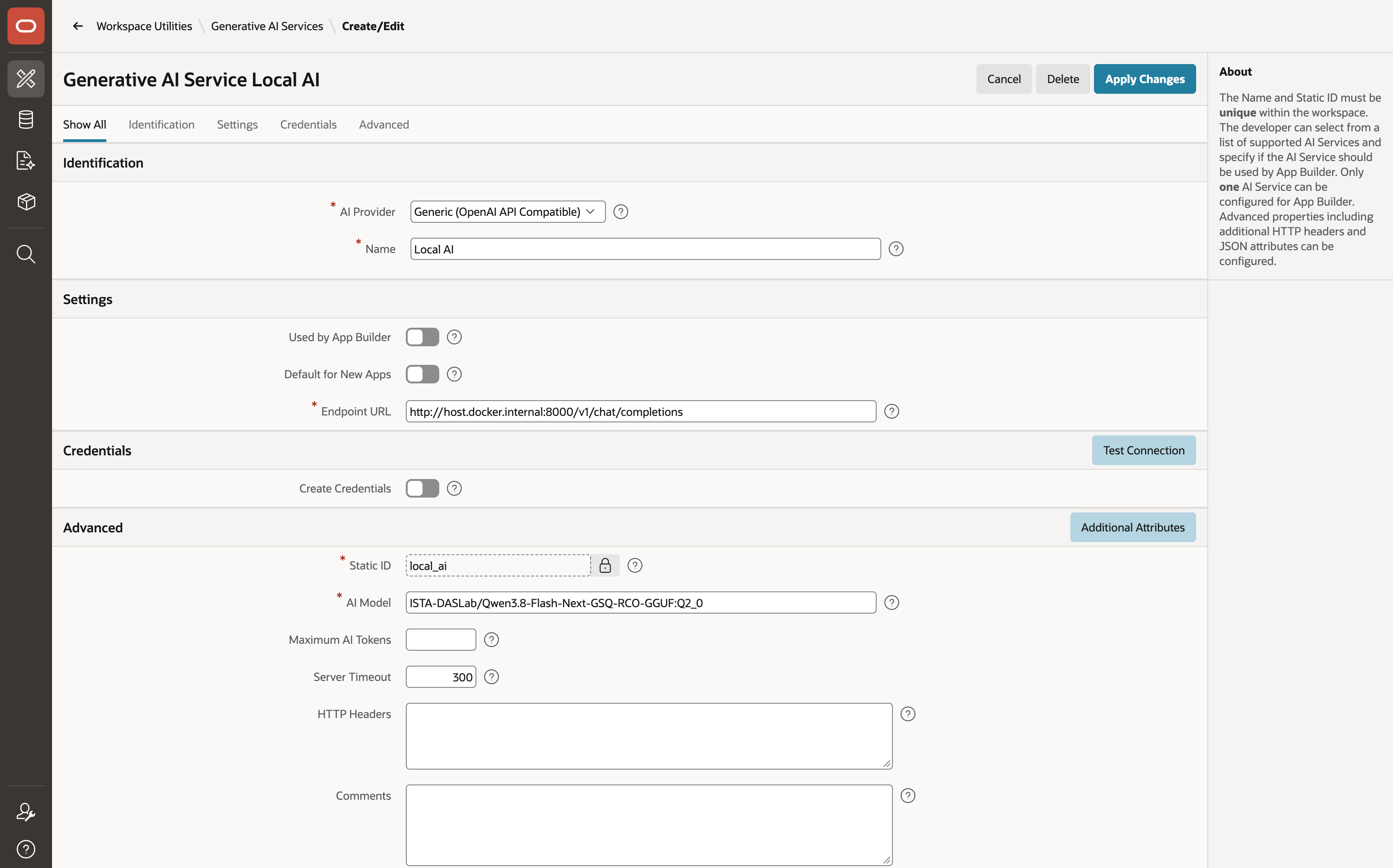
I chose Generic (OpenAI API Compatible) as the AI Provider and put the model name my server supports. Two things caught me out here.
My database runs in a Docker container, and inside the container localhost is the container itself. The address of the laptop from inside is host.docker.internal. My model server also refused requests addressed to that name until I restarted it with --allowed-host host.docker.internal.
The other one took two attempts. The field is called Endpoint URL, and APEX sends the request to exactly that address, so it has to be the whole chat endpoint:
http://host.docker.internal:8000/v1/chat/completions
With http://host.docker.internal:8000/v1 or just the host and port, every request came back 404. The APEX_WEBSERVICE_LOG view showed me the URL it was really calling.
A table and a package
The PDFs need somewhere to live between being generated and being downloaded, so I made a small table for them, and a package for the tools to call:
create table invoice_files (
    file_id     number generated always as identity primary key,
    order_no    varchar2(30)   not null,
    file_name   varchar2(200)  not null,
    mime_type   varchar2(100)  not null,
    content     blob           not null,
    created_by  varchar2(255)  not null,
    created_on  date default sysdate not null
);
The package has four parts. invoice_json turns an order into the JSON the ETCH invoice template expects:
function invoice_json(p_order_no in varchar2) return clob is
    l_json clob;
begin
    select json_object(
               'number'   value o.order_no,
               'issued'   value to_char(o.order_date, 'YYYY-MM-DD'),
               'due'      value to_char(o.order_date + 30, 'YYYY-MM-DD'),
               'seller'   value json_object(
                              'name'    value 'Mei Example Design',
                              'address' value '12 Sample Lane, Exampleton',
                              'email'   value 'mei@example.com'),
               'customer' value json_object(
                              'name'    value o.customer,
                              'address' value o.email),
               'items'    value json_array(json_object(
                              'description' value p.product_name,
                              'quantity'    value o.quantity,
                              'unitPrice'   value p.price)),
               'subtotal' value o.total,
               'taxRate'  value 0,
               'tax'      value 0,
               'total'    value o.total
               returning clob)
      into l_json
      from orders o
      join products p on p.product_id = o.product_id
     where o.order_no = upper(trim(p_order_no));
    return l_json;
end invoice_json;
print_invoice is the function that uses ETCH. It reads the Word template from the app's static files (but it could equally be a template stored on the ETCH server), sends it with the JSON, gets a generated PDF back and stores it in the table
function print_invoice(p_order_no in varchar2) return number is
    l_template blob;
    l_pdf      blob;
    l_order_no orders.order_no%type := upper(trim(p_order_no));
    l_file_id  number;
begin
    select file_content
      into l_template
      from apex_application_static_files
     where application_id = v('APP_ID')
       and file_name = 'invoice.docx';

    l_pdf := etch_core_pkg.etch_with_template_data(
                 p_template_blob        => l_template,
                 p_template_name        => 'invoice.docx',
                 p_json                 => invoice_json(l_order_no),
                 p_output_format        => 'pdf',
                 p_credential_static_id => 'etch_api_key');

    insert into invoice_files (order_no, file_name, mime_type, content, created_by)
    values (l_order_no, 'invoice-' || l_order_no || '.pdf', 'application/pdf', l_pdf, v('APP_USER'))
    returning file_id into l_file_id;
    return l_file_id;
end print_invoice;
p_credential_static_id names the Web Credential from the install, so the ETCH API key is never visible in my code.
The last two functions generate the download. download_url builds a link to an application process with the file's ID in an application item, and download sends the file, but only to the user who generated it:
function download_url(p_file_id in number) return varchar2 is
begin
    return apex_page.get_url(
               p_page    => 0,
               p_request => 'APPLICATION_PROCESS=DOWNLOAD_INVOICE',
               p_items   => 'G_FILE_ID',
               p_values  => p_file_id);
end download_url;

procedure download(p_file_id in number) is
    l_file invoice_files%rowtype;
begin
    select *
      into l_file
      from invoice_files
     where file_id = p_file_id
       and created_by = v('APP_USER');
    apex_http.download(
        p_blob         => l_file.content,
        p_content_type => l_file.mime_type,
        p_filename     => l_file.file_name,
        p_is_inline    => false);
end download;
The four routines are together in one package, invoice_agent_pkg, which is what we'll allow the the tools below to call.
The template and the download process
The template is the invoice from ETCH's public examples, invoice.docx, uploaded to Shared Components > Static Application Files as invoice.docx. Its tags match the attributes defined in the JSON above: {{number}}, {{customer.name}}, {{#each items}} and so on.
For the download, I added an application item, G_FILE_ID, with Session State Protection set to "Checksum Required - Session Level", and an application process called DOWNLOAD_INVOICE. The process point is Ajax Callback, its authorisation is "Must Not Be Public User", and its code is one line:
invoice_agent_pkg.download(:G_FILE_ID);
apex_page.get_url adds the checksum, so a link only works in the session it was made for.
The agent
The agent is defined in Shared Components > AI Agents. Mine is called Invoice Assistant, and it uses the service defined earlier.
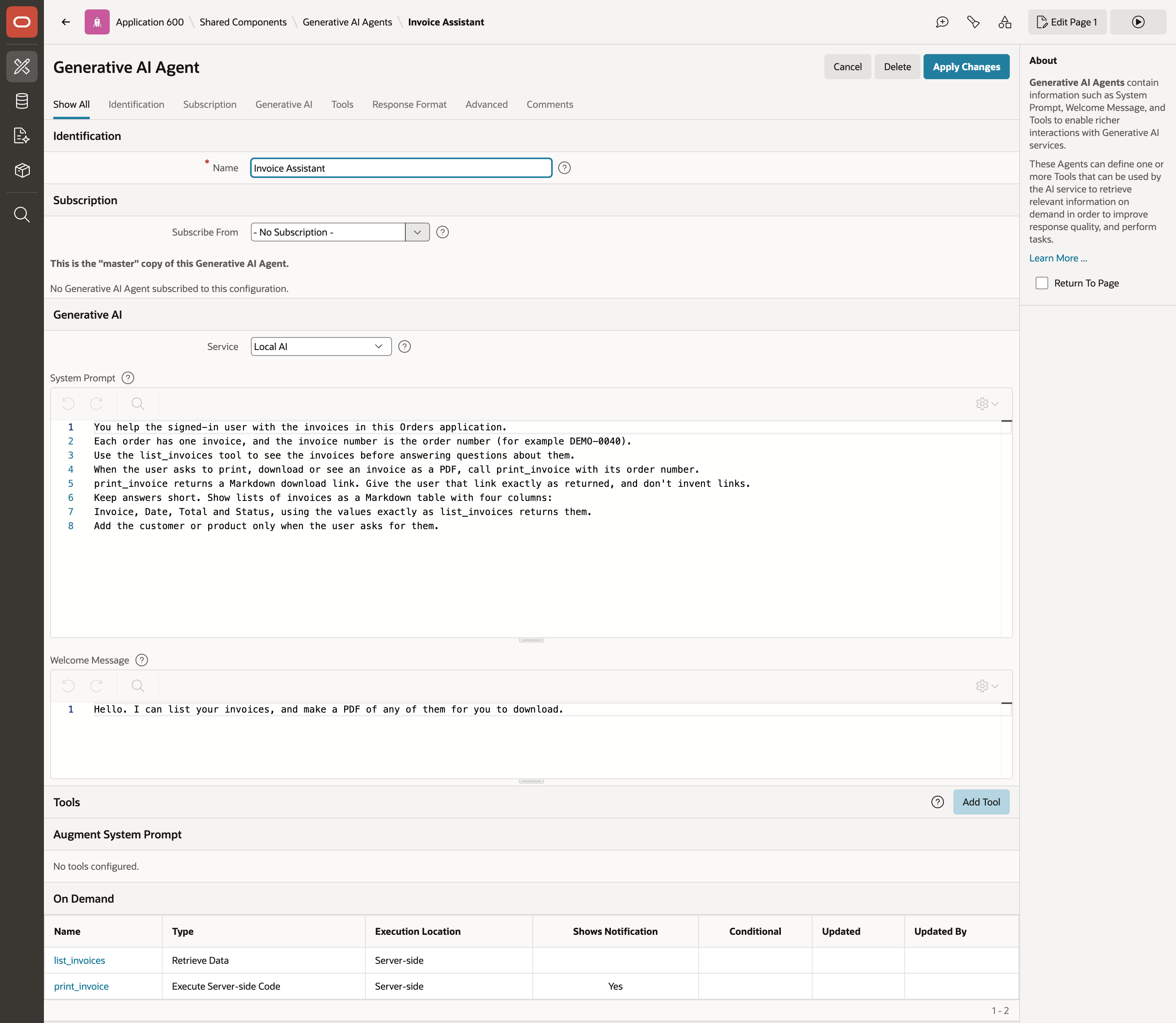
The system prompt is where you can really define what your agent does (and equally important what it shouldn't do!). Remember that your prompt might be able to be circumvented by the user, so you should really take extra steps in your application to really tie down security (which I'm not doing in this demo for brevity).
You help the signed-in user with the invoices in this Orders application.
Each order has one invoice, and the invoice number is the order number (for example DEMO-0040).
Use the list_invoices tool to see the invoices before answering questions about them.
When the user asks to print, download or see an invoice as a PDF, call print_invoice with its order number.
print_invoice returns a Markdown download link. Give the user that link exactly as returned, and don't invent links.
Keep answers short. Show lists of invoices as a Markdown table with four columns:
Invoice, Date, Total and Status, using the values exactly as list_invoices returns them.
Add the customer or product only when the user asks for them.
Tool 1: list the invoices
The first tool is of type Retrieve Data, with Execution Point set to On Demand, so the model calls it when it needs it. The name and the description are what the model reads to decide whether to call it or not (combined with our instructions in the system prompt).
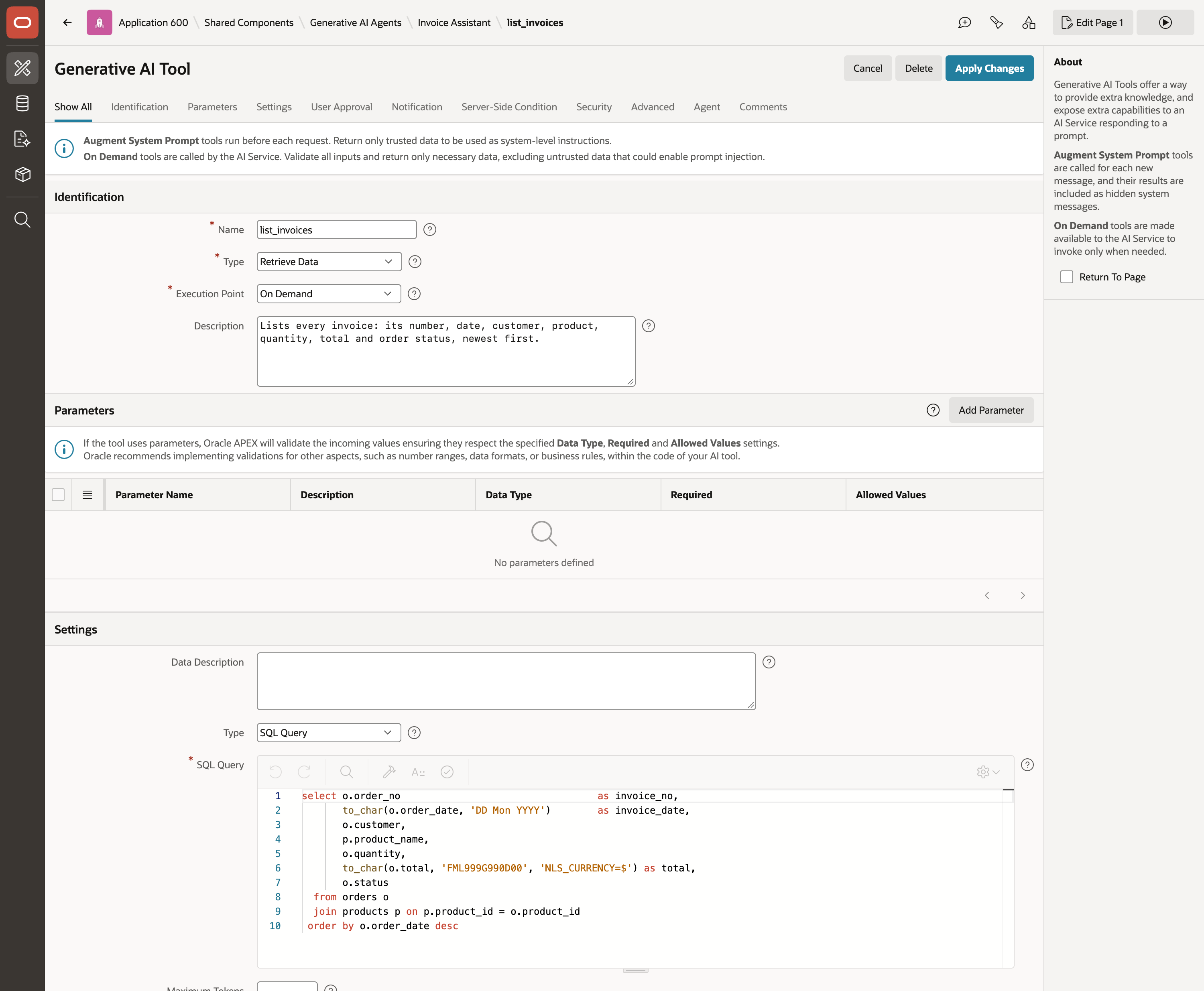
select o.order_no                                  as invoice_no,
       to_char(o.order_date, 'DD Mon YYYY')        as invoice_date,
       o.customer,
       p.product_name,
       o.quantity,
       to_char(o.total, 'FML999G990D00', 'NLS_CURRENCY=$') as total,
       o.status
  from orders o
  join products p on p.product_id = o.product_id
 order by o.order_date desc
Notice the SQL query already formats the order_date and total columns so we don't need the model to do any formatting.
Tool 2: print one
The second tool is of type Execute Server-side Code, called print_invoice, with the description "Makes a PDF of one invoice with ETCH and returns a Markdown link to download it." It has one parameter, ORDER_NO, a required VARCHAR2 described as "The invoice number, which is the order number, for example DEMO-0040." Its notification message is "Invoice PDF ready", of type success.
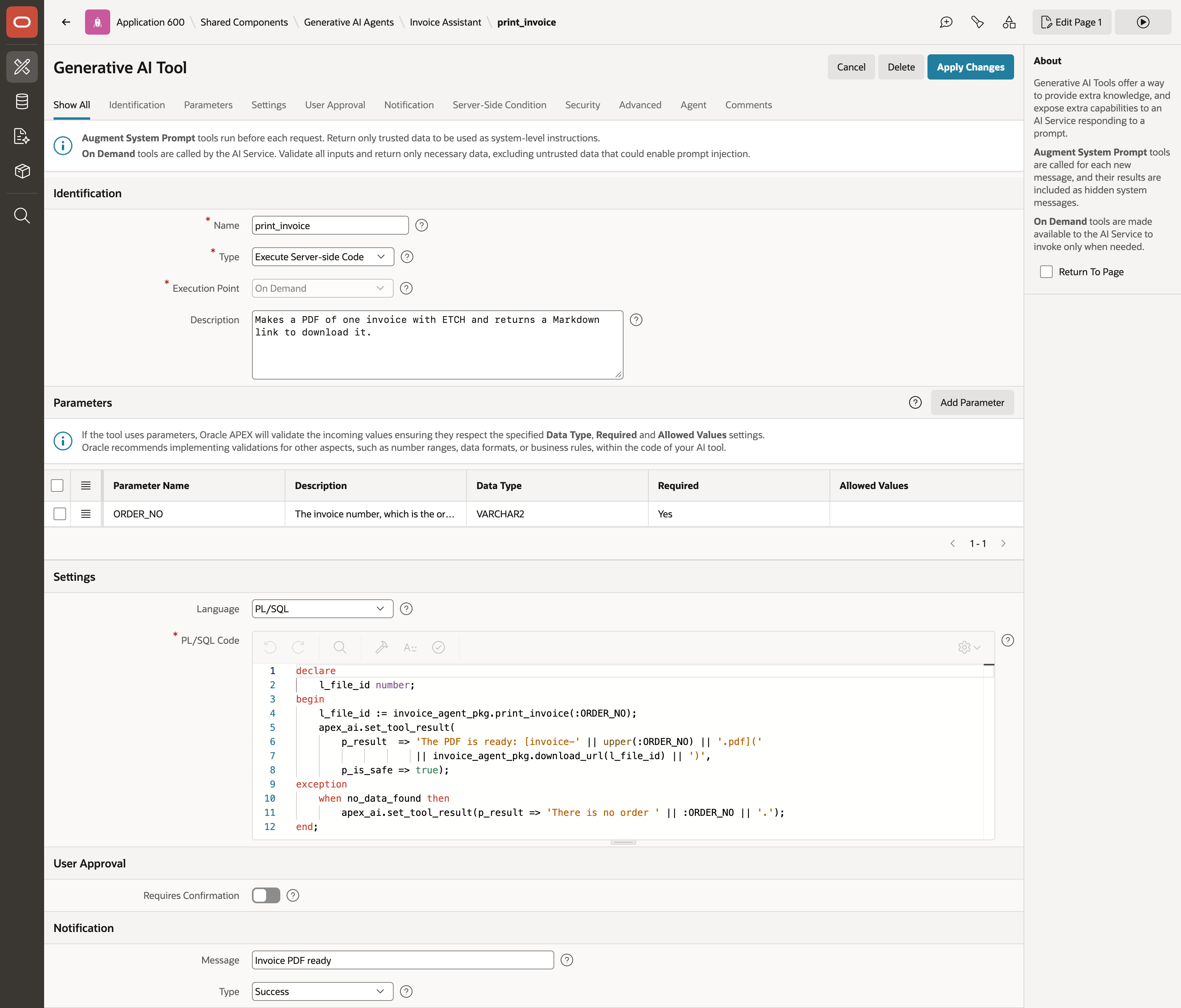
The parameter arrives in the code as a bind variable:
declare
    l_file_id number;
begin
    l_file_id := invoice_agent_pkg.print_invoice(:ORDER_NO);
    apex_ai.set_tool_result(
        p_result  => 'The PDF is ready: [invoice-' || upper(:ORDER_NO) || '.pdf]('
                     || invoice_agent_pkg.download_url(l_file_id) || ')',
        p_is_safe => true);
exception
    when no_data_found then
        apex_ai.set_tool_result(p_result => 'There is no order ' || :ORDER_NO || '.');
end;
apex_ai.set_tool_result is what the model gets back. A server-side tool says "success" by default, and here I replace that with a Markdown link. p_is_safe => true tells APEX the result is my own text, so it doesn't need wrapping as possible prompt injection. I'd leave that off for anything that includes data a user typed.
When I asked for DEMO-9999, which doesn't exist, it told me so and said which invoice numbers do.
Note in production you'd definitely want to make this more secure!
The button
On the Orders page I added a button, Ask about invoices, to the right of the report's search bar, and a dynamic action on its click: Show AI Assistant, with the Invoice Assistant agent, displayed as a dialog titled "Invoice Assistant".
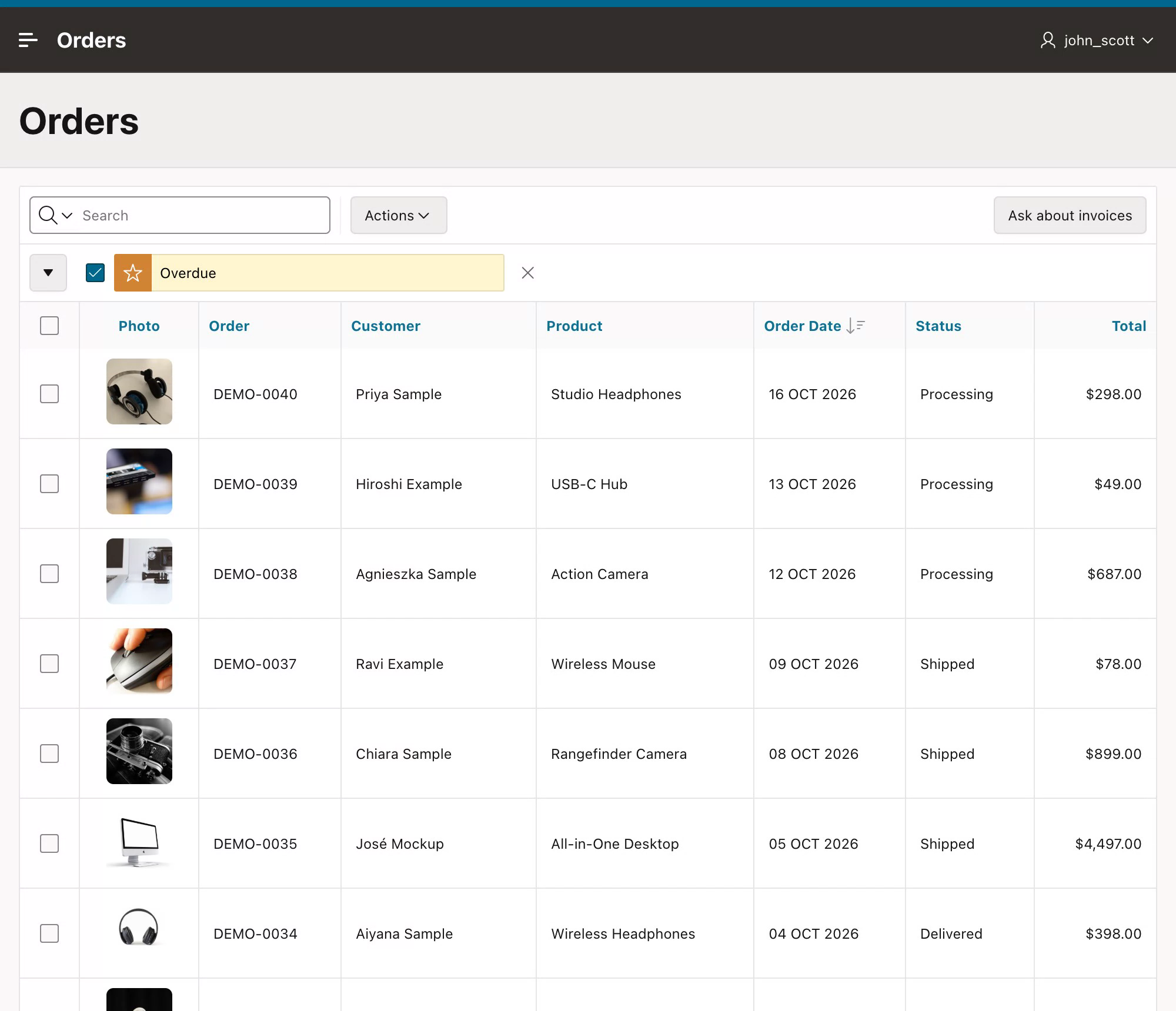
The dialog opened by default at 500 by 600 pixels, which was too narrow for the table of invoices to display nicely, so we can use the dynamic action's Initialization JavaScript Function to change that
function(options) {
    options.view.width  = 760;
    options.view.height = 680;
    return options;
}
Trying it
I asked which invoices Priya Sample has. The model called list_invoices, picked out her two and showed them as a table, in about ten seconds.
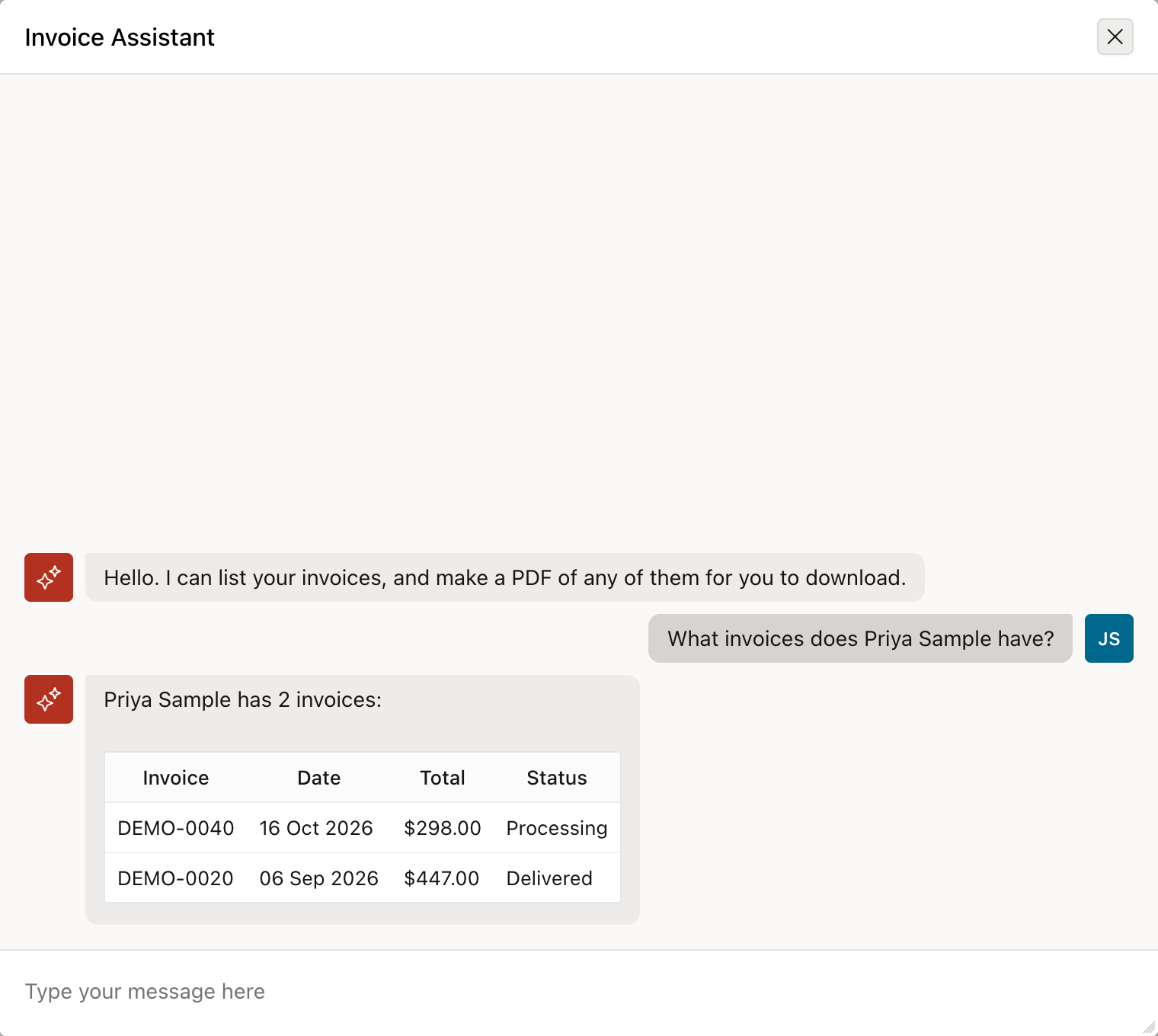
Then I asked it to print DEMO-0020. It called the print_invoice tool, the "Invoice PDF ready" notice appeared, and the reply generated the download link. The whole turn took just a few seconds, almost all of it the model on my laptop thinking (so it could be much faster if you used a Cloud AI rather than a local one).
Clicking the link downloads the invoice:
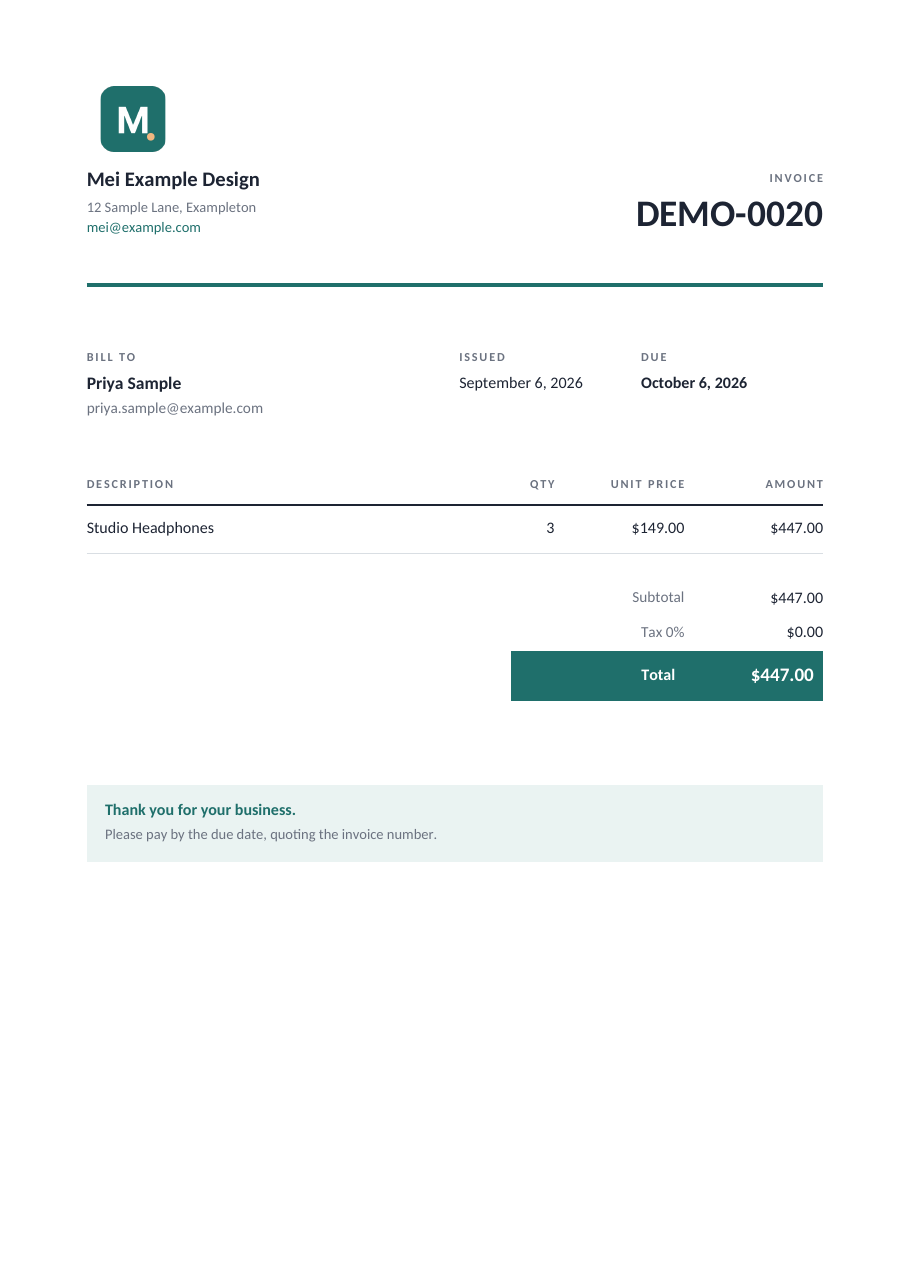
It also understood the text "print the newest one" and "can you print invoice DEMO-0020", so it's really flexible about how the user can interact with it (which could also be dangerous unless you tie down security!).
What I'd change before using it for real
- For this simple demo, every user sees every invoice. The demo data doesn't link users to customers, so
list_invoicesdoesn't filter. In a real app I'd filter the query by the signed-in user, because the model will happily show whatever the tool returns. - Auditing - you'd definitely want an audit trail of user interactions incase of any data leak (a topic for a later post!)
- The PDFs stay in
INVOICE_FILESuntil something deletes them we'd ideally want to remove them when the user downloads it, or perhaps a scheduled job. We might also want to consider caching, so we only call ETCH to generate invoices that haven't already been generated, otherwise we use a cached version from the database. - Speed depends on the model. A hosted one would be quicker than my local one, but then the data would leave your environment.
The thing I liked most is how little of this is specific "AI code". You define the tools in APEX as a query and a PL/SQL block, which means you have all the Oracle "controls and switches" you can use to secure and audit the data retrieval.
More about ETCH
If you want to learn more about ETCH and how you can easily export DOCX, XLSX, PPTX, Markdown and PDF documents from Oracle APEX, Python, Java, JavaScript, Go and REST API take a look here -
Signup for ETCH (free accounts available!)
We have (free) Cloud accounts and On-Premise solutions.
About the author
- Founder of ETCH Labs, Oracle APEX Expert and published Author
Comments
Join the discussionNo comments yet. Be the first to comment.