Oracle Deep Data Security integration with APEX
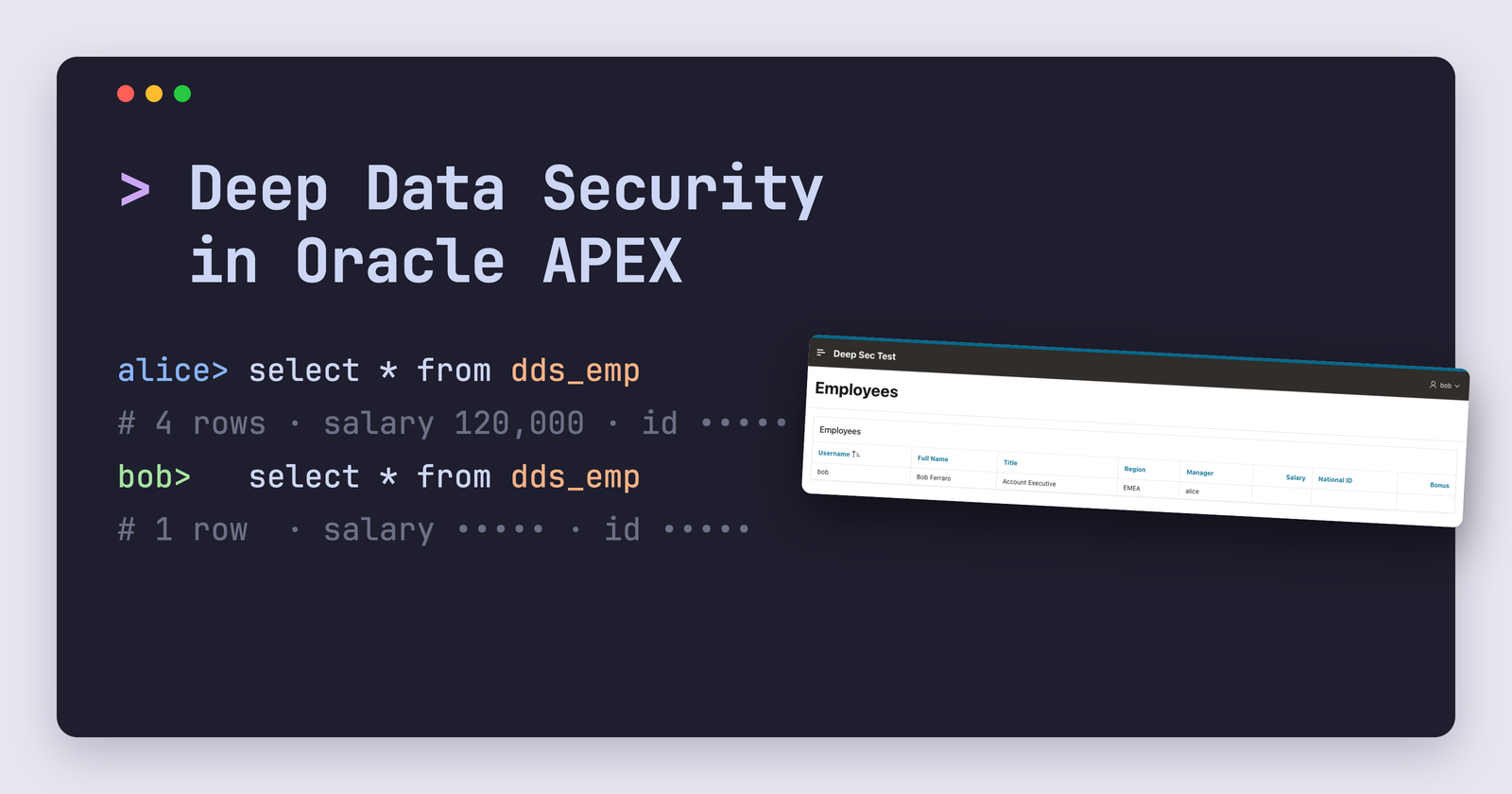
Here's an ordinary APEX report. The region's source is about the laziest query a developer can write - select * from employees, there's no WHERE clause and all columns are included.
We're logged in as the user Bob and they can see everything
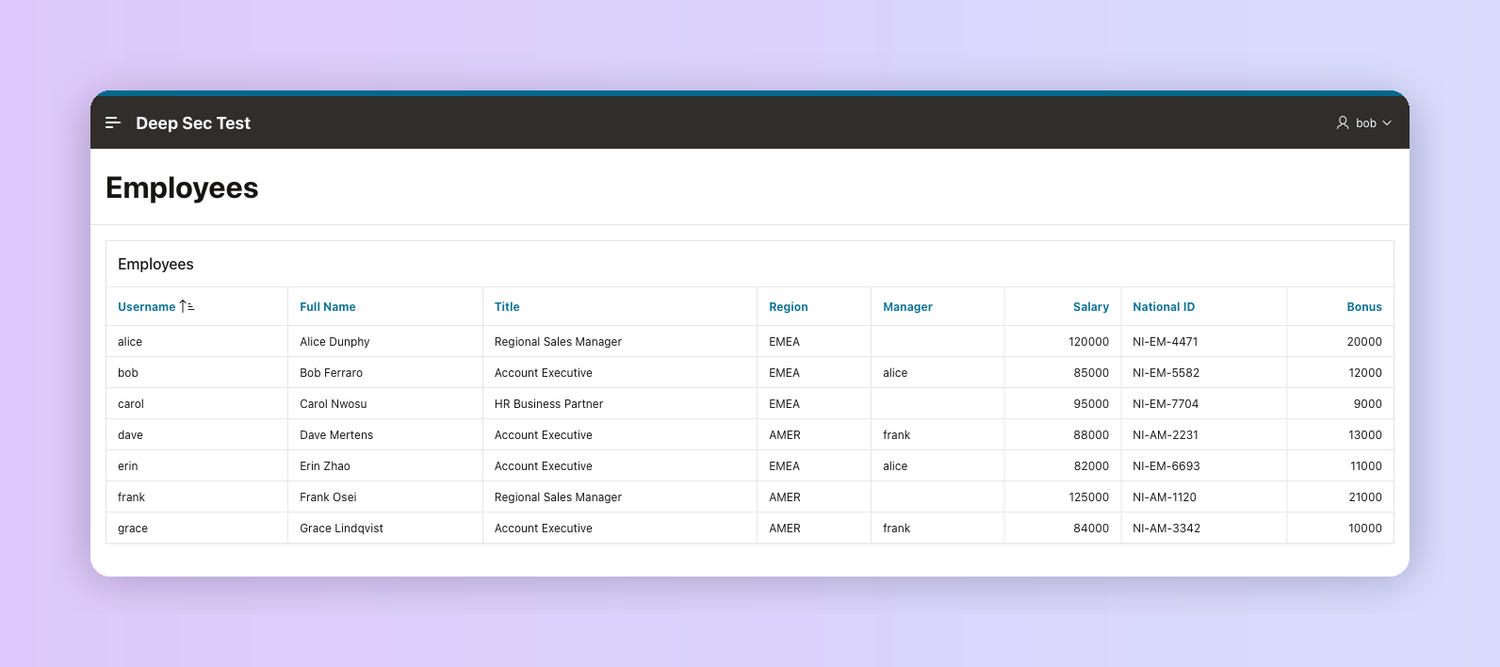
ok, let's do some magic with Deep Data Security, I'm not changing anything in my APEX application, the report query will still be the select * from employees, but now Bob will see this
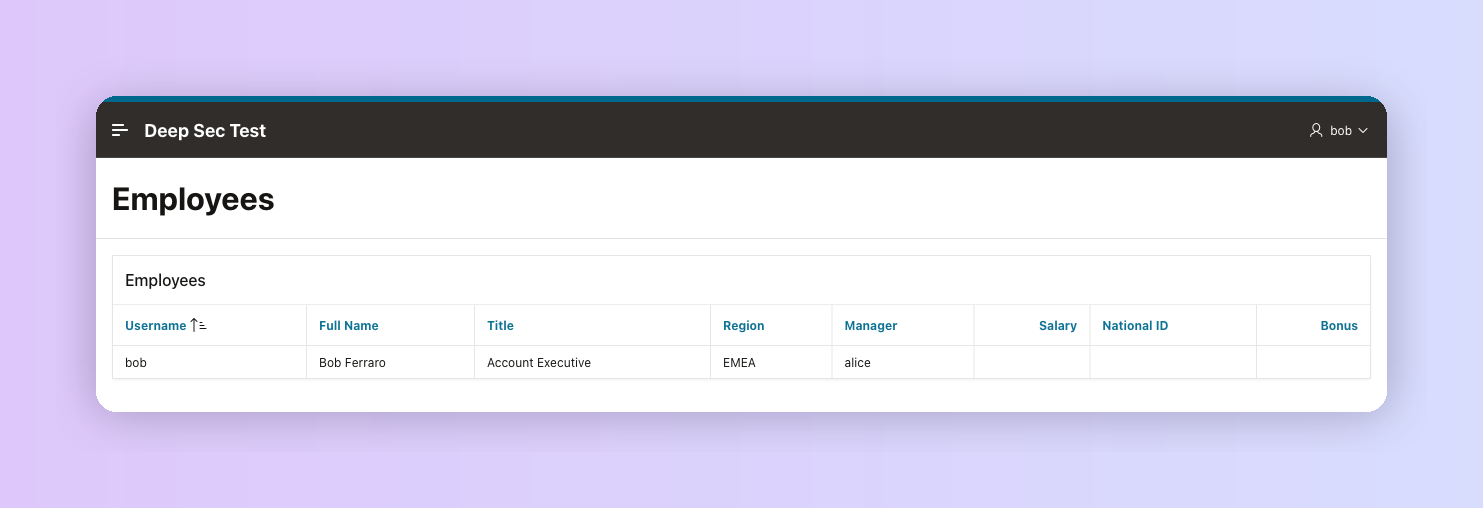
Notice he only sees one row now, his own record, and the salary, national ID and bonus columns are blank.
So even though the APEX query should have shown us everything, the database is enforcing additional security checks and has removed rows, columns and cells we shouldn't see.
The thing we changed is using Deep Data Security, which is new in Oracle AI Database 26ai. It's a data-authorization layer enforced at the database level.
You describe who your users are and what each may see, and the database applies it to every statement, no matter which client application runs the query.
Deep Data Security can be used with OCI IAM or Microsoft Entra, but also it can be used with Keycloak which can run in a Docker container so you don't need to use a Cloud provider.
A note on the names. Throughout this post the users are Alice, Bob, Carol, Dave and so on - the standard placeholder names people reach for in security examples (Alice and Bob have been the cast of cryptography papers since the 1970s).
Everything in these demos is being run on a local Oracle AI Database 26ai (23.26.4 Free) with APEX 26.2 and ORDS, plus a self-hosted Keycloak container as the identity provider.
One table, four people
Here's the data in my table, the typical sort of employee/compensation table you would want to lock down
| username | full name | title | region | manager | salary | national_id | bonus |
|---|---|---|---|---|---|---|---|
| alice | Alice Dunphy | Regional Sales Manager | EMEA | 120000 | NI-EM-4471 | 20000 | |
| bob | Bob Ferraro | Account Executive | EMEA | alice | 85000 | NI-EM-5582 | 12000 |
| carol | Carol Nwosu | HR Business Partner | EMEA | 95000 | NI-EM-7704 | 9000 | |
| … | … | … | … | … | … | … | … |
In the demo, four users should be able to see different facets of the data
- Bob, an account executive, should see only his own row - no pay, no national ID. (That's the second screenshot above.)
- Alice, the EMEA sales manager, should see everyone in her region, salaries included, but no national IDs.
- Carol, in HR, should see everyone - with salaries, except the executives' - national IDs masked, and she can update pay.
- Dave, a compliance officer, should see everyone's national ID for audits, and nobody's pay.
Obviously this is just a demo, Deep Data Security lets you define exactly what you want in your scenario.
Key components
Four key components are necessary
- End users - the users your app serves. They don't own schemas or tables (unlike typical Oracle database users), you create them with
CREATE END USERlocally or from an identity provider. - Data roles - a role used purely for data access. A data role can be local, or mapped to a role your identity provider puts in a token.
- Data grants - these define the rules, a privilege (
SELECT,UPDATE, …), an optional column list, an optionalWHEREpredicate, and the data role it's granted to. It's important to know that grants are additive, in other words a user's access is the union of all the grants they hold. - The end-user security context - the runtime object the database generates once it knows which end user a request is for.
One of the most key components is the data role, since it maps a role from your identity provider to database access. For example imagine four roles - EMP, MGR, HR, COMPLIANCE defined in each person's token returned from the IAM. Then the database data roles can map to these roles.
CREATE DATA ROLE dr_emp  MAPPED TO 'ROLE=EMP';
CREATE DATA ROLE dr_mgr  MAPPED TO 'ROLE=MGR';
CREATE DATA ROLE dr_hr   MAPPED TO 'ROLE=HR';
CREATE DATA ROLE dr_comp MAPPED TO 'ROLE=COMPLIANCE';
You can also define that the table is only accessible via the data grants rather than regular queries (even SELECT ANY TABLE privilege is denied).
SET USE DATA GRANTS ONLY ON qr_lab.dds_emp ENABLED;
If we lock the table down and don't define any grants yet, every signed-in user sees an empty report. Remember our APEX report still just runs a select * without any WHERE clause, all the security is being done by Deep Data Security.
Row level: you only see your own row
Let's define a data grant so users are limited to their own rows. The WHERE clause defines the row rule, notice the explicit column list is the column rule (and that salary, national_id and bonus columns aren't named)
CREATE DATA GRANT qr_lab.g_emp_own AS
  SELECT (emp_id, username, full_name, title, region, manager)
  ON qr_lab.dds_emp
  WHERE lower(username) = lower(ORA_END_USER_CONTEXT.username)
  TO dr_emp;
ORA_END_USER_CONTEXT.username is the signed-in user's name, obtained via the token issued via Keycloak and passed to Deep Data Security.
Remember in the screenshot at the top of this blog post, the single row blanked-out view, of Bob's record? This grant is what achieved that, the database compared his token's username to each row and dropped the other rows (even though the APEX query did select * without a where clause), and returned null for every column he wasn't granted explicit permission for.
Column level and masking
Columns can disappear in two ways, and they look identical to the user (an empty cell) but read differently in the grant:
- Column level - you list the columns a role may see; anything you leave out is masked. That's what is hiding the salary column from Bob.
- Masking with
ALL COLUMNS EXCEPT- you grant everything except named columns. Handy for "show all the business data but never the PII".
Dave the compliance officer is an example of this, his grant lists only the identity columns and the national ID:
CREATE DATA GRANT qr_lab.g_comp_pii AS
  SELECT (emp_id, username, full_name, national_id)
  ON qr_lab.dds_emp
  TO dr_comp;      -- no WHERE: all rows
So Dave sees every employee's national ID - and nothing about their pay.
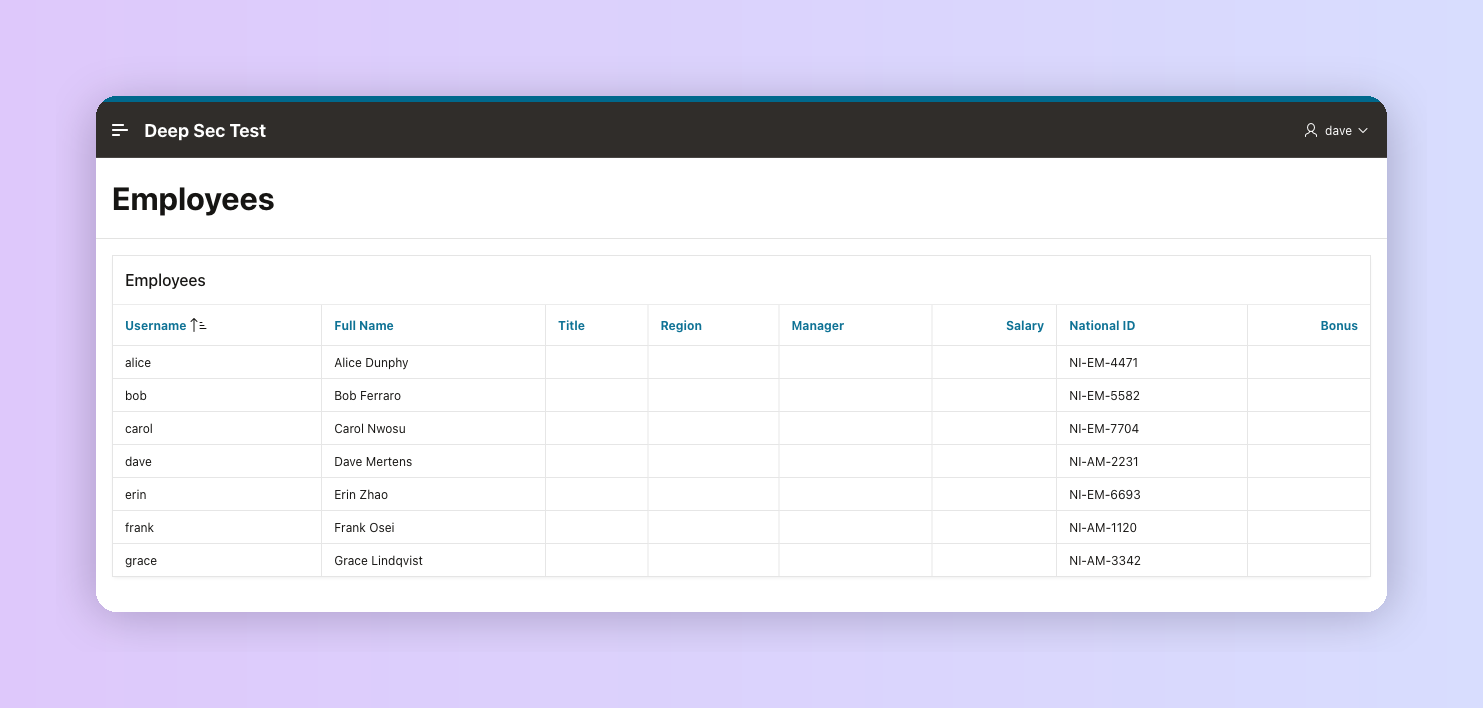
Cell level: mask some row values but not others
Column level security can null a whole column for a user. Cell-level security nulls it for some rows and not others, the same column but decided per row. Deep Data Security can achieve this with nothing more than two additive grants.
Carol in HR should see everyone, with most salaries but not the executives pay and never the national IDs. So she gets a base grant for everything except the PII and the pay columns, plus an UPDATE on pay
CREATE DATA GRANT qr_lab.g_hr_all AS
  SELECT (ALL COLUMNS EXCEPT national_id, salary, bonus),
  UPDATE (salary, bonus)
  ON qr_lab.dds_emp
  TO dr_hr;        -- all rows
and a second grant that adds back the pay columns, but only for non-managers
CREATE DATA GRANT qr_lab.g_hr_pay AS
  SELECT (salary, bonus)
  ON qr_lab.dds_emp
  WHERE title NOT LIKE '%Manager%'
  TO dr_hr;
Because grants are additive, the base grant gives Carol every row with most columns; the second grant lights up salary and bonus, but only on the rows whose title isn't a manager's. The two managers' pay cells are never granted, so they stay null.
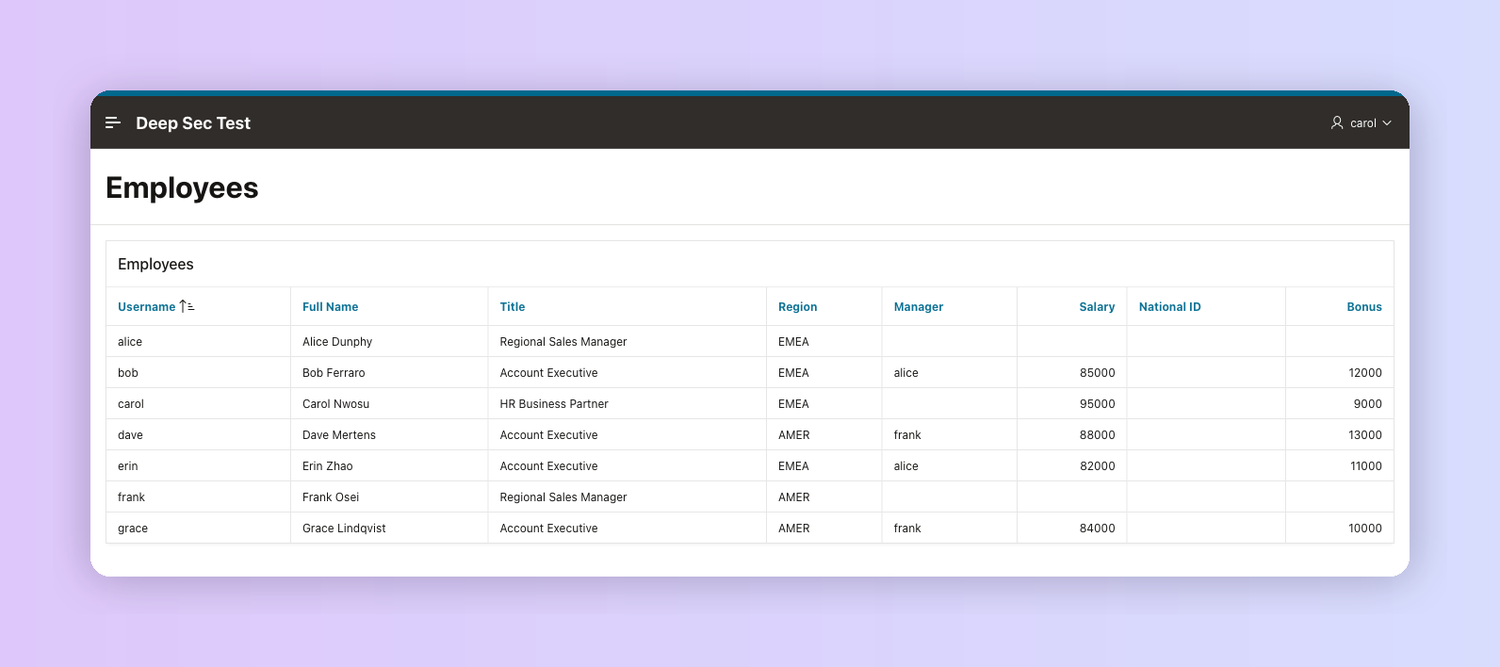
National IDs are gone for everyone (column level), and Alice's and Frank's salaries (the two Regional Sales Managers) are gone while the rest remain.
Region level - deriving access from a custom context
Alice's rule is "see everyone in my region". I could hard-code regions, but a nicer way is a custom end-user context: a named bag of attributes attached to the session, filled lazily the first time it's read by a PL/SQL handler. That handler is where your own logic lives - look the user up, read another table, whatever you need.
Define the context and use an attribute with a custom handler using o:onFirstRead
CREATE END USER CONTEXT qr_lab.emp_ctx USING JSON SCHEMA
 '{"type":"object",
   "properties":{
     "region":{"type":"string","o:onFirstRead":"qr_lab.emp_sec.init_ctx"}}}';
The handler is a PL/SQL procedure that looks up the signed-in user and adds their region into the context
CREATE OR REPLACE PACKAGE BODY qr_lab.emp_sec AS
  PROCEDURE init_ctx IS
    l_user   VARCHAR2(128);
    l_region VARCHAR2(10);
  BEGIN
    SELECT JSON_VALUE(JSON_SERIALIZE(ORA_END_USER_CONTEXT),'$.USERNAME')
      INTO l_user FROM dual;
    SELECT region INTO l_region
      FROM qr_lab.dds_emp WHERE lower(username) = lower(l_user);
    EXECUTE IMMEDIATE
      q'{update sys.end_user_context t set t.context.region = :r
          where owner='QR_LAB' and name='EMP_CTX'}'
      USING l_region;
  END;
END;
Why EXECUTE IMMEDIATE and not a plain UPDATE? You update a context with a normal UPDATE on the SYS.END_USER_CONTEXT view (there's no table behind it), but it seems updating a JSON attribute by dot-notation (e.g. t.context.region = <value>) only works when the SQL engine parses the statement directly. Doing it as static SQL inside any PL/SQL unit, e.g. a handler, a procedure, an APEX process etc seems to make it fail at runtime with ORA-52663 so the update has to be dynamic.
Despite the documentation saying bind variables not working, I found you can still bind the value (the :r and USING l_region above), which at least avoids the concatenation potential security issue.
Alice's grant then references the context attribute instead of a literal:
CREATE DATA GRANT qr_lab.g_mgr_region AS
  SELECT (emp_id, username, full_name, title, region, manager, salary, bonus)
  ON qr_lab.dds_emp
  WHERE region = ORA_END_USER_CONTEXT.qr_lab.emp_ctx.region
  TO dr_mgr;
When Alice signs in, the PL/SQL handler is called once, sets region = 'EMEA', and she sees her whole region rows with the salaries visible, national IDs masked.
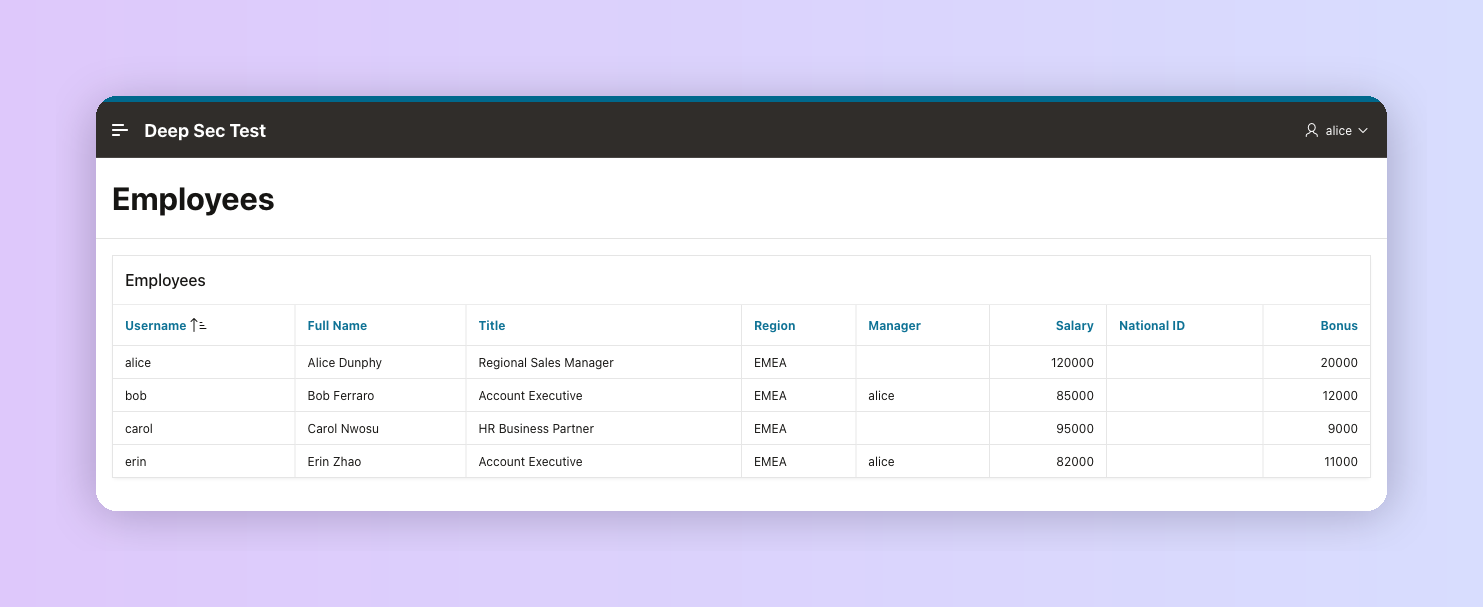
One snag I found, the end user also needs permission to read the custom context and its predicate references, or the query fails with ORA-01031: insufficient privileges. You can grant that like any other data grant
CREATE DATA GRANT qr_lab.g_mgr_ctx AS
  SELECT ON sys.end_user_context
  WHERE owner = 'QR_LAB' AND name = 'EMP_CTX'
  TO dr_mgr;
So that's four different users and four different result sets, all from the one unchanged select *. Everything so far has been on the database side. Now let's see how users can login.
Integrating APEX login with a self-hosted Keycloak
Deep Data Security accepts a configurable OAuth 2.0 provider, and the documented, supported one is Keycloak, which can run in a container next to your database. Your users can authenticate against Keycloak using an APEX Social Sign-In scheme.
Run Keycloak (dev mode is fine for a demo, but obviously you would want something properly setup for production usage):
docker run -d --name keycloak --network deepsec-net -p 8088:8080 \
  -e KC_BOOTSTRAP_ADMIN_USERNAME=admin -e KC_BOOTSTRAP_ADMIN_PASSWORD=admin \
  quay.io/keycloak/keycloak:26.4 start-dev
In Keycloak you'll need to set up the realm, a client, the persona roles, the users, and a mapping function (to map from Keycloak to your Oracle roles).
I used Keycloak's admin CLI (kcadm.sh which is already installed inside the container).
# create a helper, so we're not typing the full path each time
kc() { docker exec keycloak /opt/keycloak/bin/kcadm.sh "$@"; }

# log in as the Keycloak admin (the credentials from the docker run above). Obviously don't use a better password!
kc config credentials --server http://localhost:8080 \
  --realm master --user admin --password admin

# 1) Create a realm for the demo
kc create realms -s realm=deepsec -s enabled=true

# 2) Create a client scope
kc create client-scopes -r deepsec -s name=db-scope -s protocol=openid-connect
SID=$(kc get client-scopes -r deepsec \
      | python3 -c "import sys,json;print(next(s['id'] for s in json.load(sys.stdin) if s['name']=='db-scope'))")
kc create client-scopes/$SID/protocol-mappers/models -r deepsec \
  -s name=db-aud -s protocol=openid-connect \
  -s protocolMapper=oidc-audience-mapper \
  -s 'config."included.custom.audience"=oracle-db' \
  -s 'config."access.token.claim"=true'

# 3) setup the client config we can use in APEX Social Sign-In
kc create clients -r deepsec \
  -s clientId=apex-app -s enabled=true -s publicClient=false \
  -s standardFlowEnabled=true -s serviceAccountsEnabled=true \
  -s secret=apex-app-secret-123 \
  -s 'redirectUris=["http://localhost:8264/ords/apex_authentication.callback","http://localhost:8264/*"]'
CID=$(kc get clients -r deepsec -q clientId=apex-app \
      | python3 -c "import sys,json;print(json.load(sys.stdin)[0]['id'])")

# set db-scope to a default scope, so aud=oracle-db is set in every token this client issues
kc update clients/$CID/default-client-scopes/$SID -r deepsec

# 4) copy the user's realm roles into a flat, top-level
#    "roles" claim. Keycloak's default stores them under realm_access.roles; the database reads
#    a flat "roles" claim (its roles_claim defaults to "roles"), so without this mapping the
#    data roles never resolve and every signed-in user sees nothing. This caught me out!
kc create clients/$CID/protocol-mappers/models -r deepsec \
  -s name=realm-roles-top -s protocol=openid-connect \
  -s protocolMapper=oidc-usermodel-realm-role-mapper \
  -s 'config."claim.name"=roles' -s 'config.multivalued=true' \
  -s 'config."jsonType.label"=String' -s 'config."access.token.claim"=true'

# 5) loop and create a realm role per persona - these names match the data roles' MAPPED TO 'ROLE=...' values
for r in EMP MGR HR COMPLIANCE; do kc create roles -r deepsec -s name=$r; done

# 6) create the four users. Give each a first/last name which is required by Keycloak and assign a role.
newuser() {  # newuser <username> <role>
  kc create users -r deepsec -s username=$1 -s enabled=true \
     -s firstName=$1 -s lastName=User -s email=$1@example.com
  kc set-password -r deepsec --username $1 --new-password Welcome_1
  kc add-roles  -r deepsec --uusername $1 --rolename $2
}
newuser alice MGR
newuser bob   EMP
newuser carol HR
newuser dave  COMPLIANCE
Step 4 is the one that caught me out. Everything else is ordinary identity-provider config. The flat roles claim is the single thing Deep Data Security seems to be fussy about, because that claim is how the Keycloak role MGR links to the database data role DR_MGR. In the Keycloak admin console that mapper is a User Realm Role mapper writing a multivalued, top-level roles claim into the access token
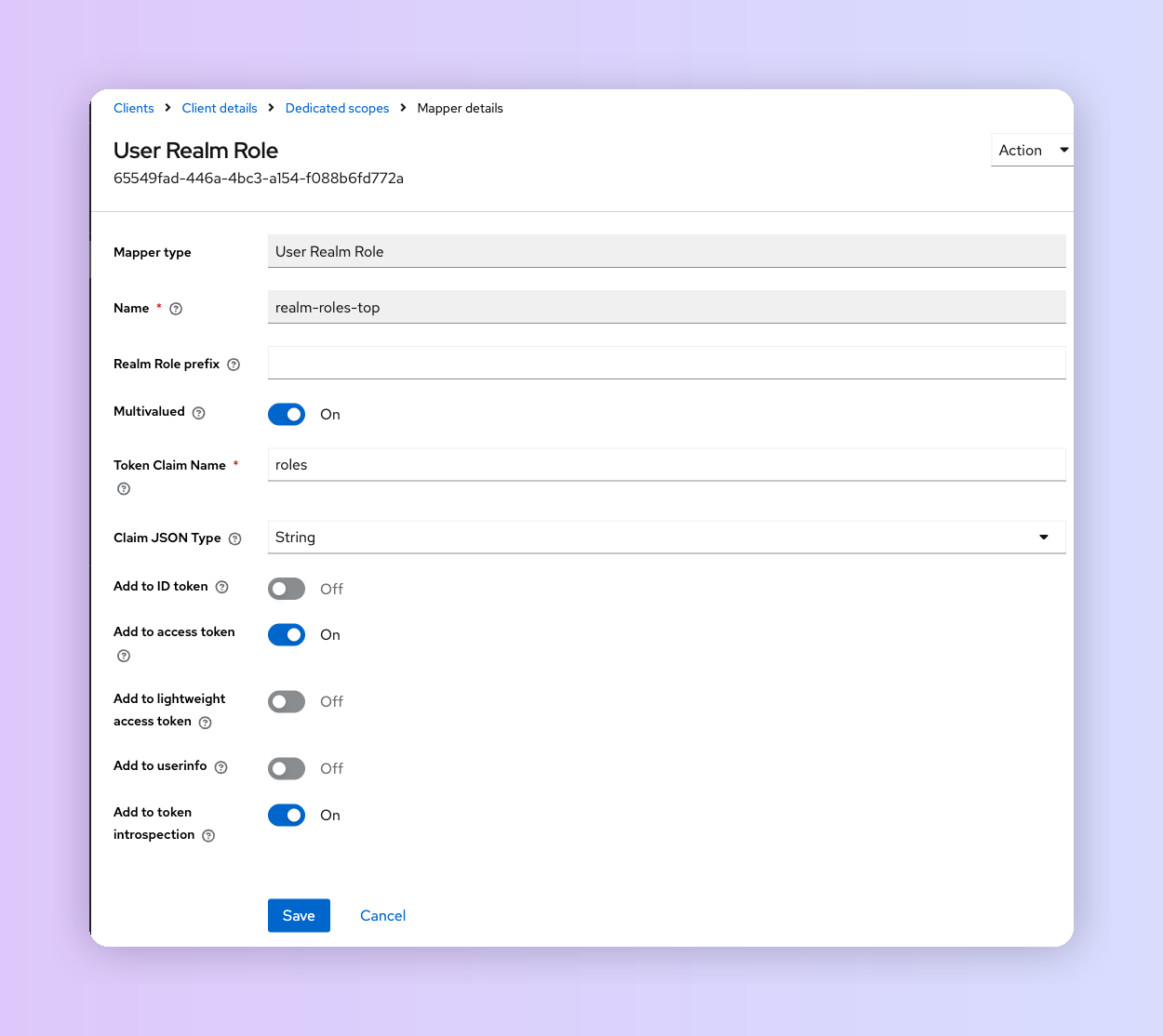
On the database side you point Oracle at Keycloak with two parameters:
ALTER SYSTEM SET IDENTITY_PROVIDER_TYPE = OAUTH2 SCOPE=BOTH;

ALTER SYSTEM SET IDENTITY_PROVIDER_CONFIG = '{
  "issuer":"http://.../realms/deepsec",
  "jwks_uri":"http://.../realms/deepsec/protocol/openid-connect/certs",
  "audience":"oracle-db",
  "username_claim":"preferred_username",
  "application_id_claim":"azp"
}' SCOPE=BOTH;
(obviously use your own URLs)
Integrating the APEX app with Keycloak
The APEX side needs two things, firstly a Web Credential (Shared Components → Web Credentials), with type OAuth2 Client Credentials, using the apex-app client and its secret:
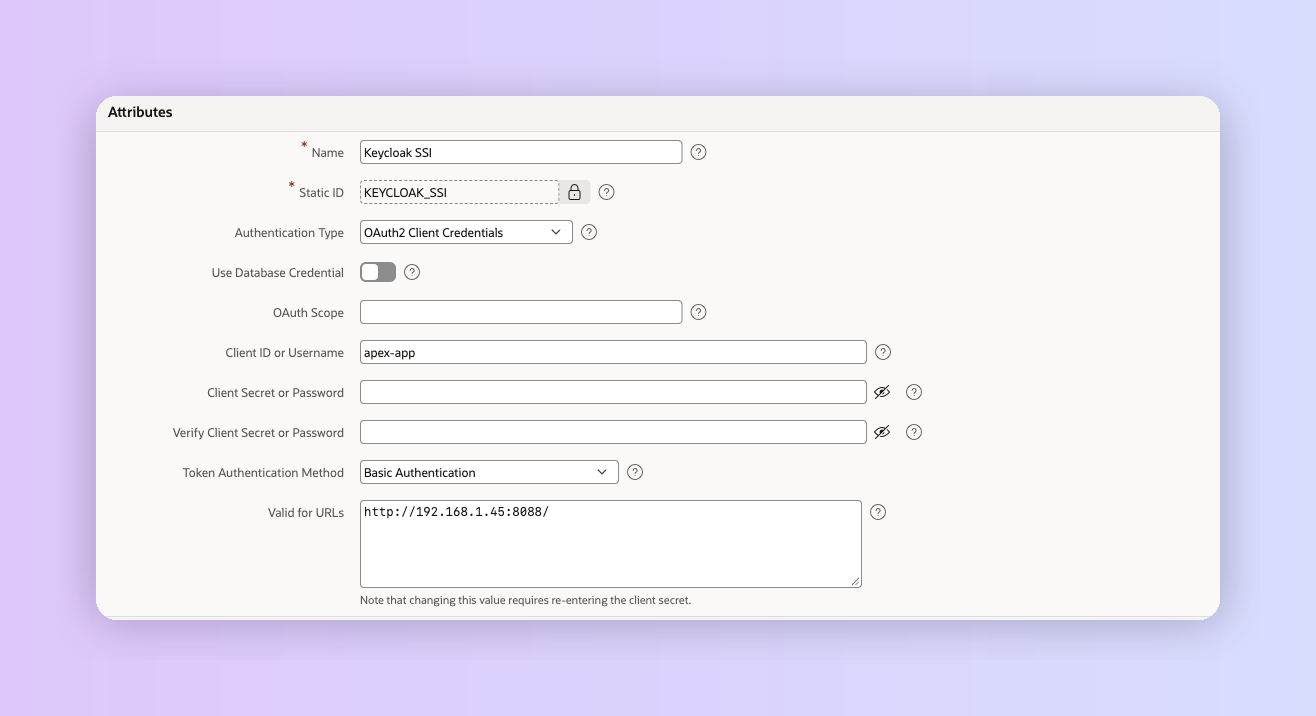
(APEX stores the secret encrypted and never displays it again - the field stays blank on return visits.)
Then a Social Sign-In scheme (Shared Components → Authentication Schemes → Create → based on a pre-configured scheme → Social Sign-In), with the OpenID Connect provider pointed at Keycloak's discovery URL:
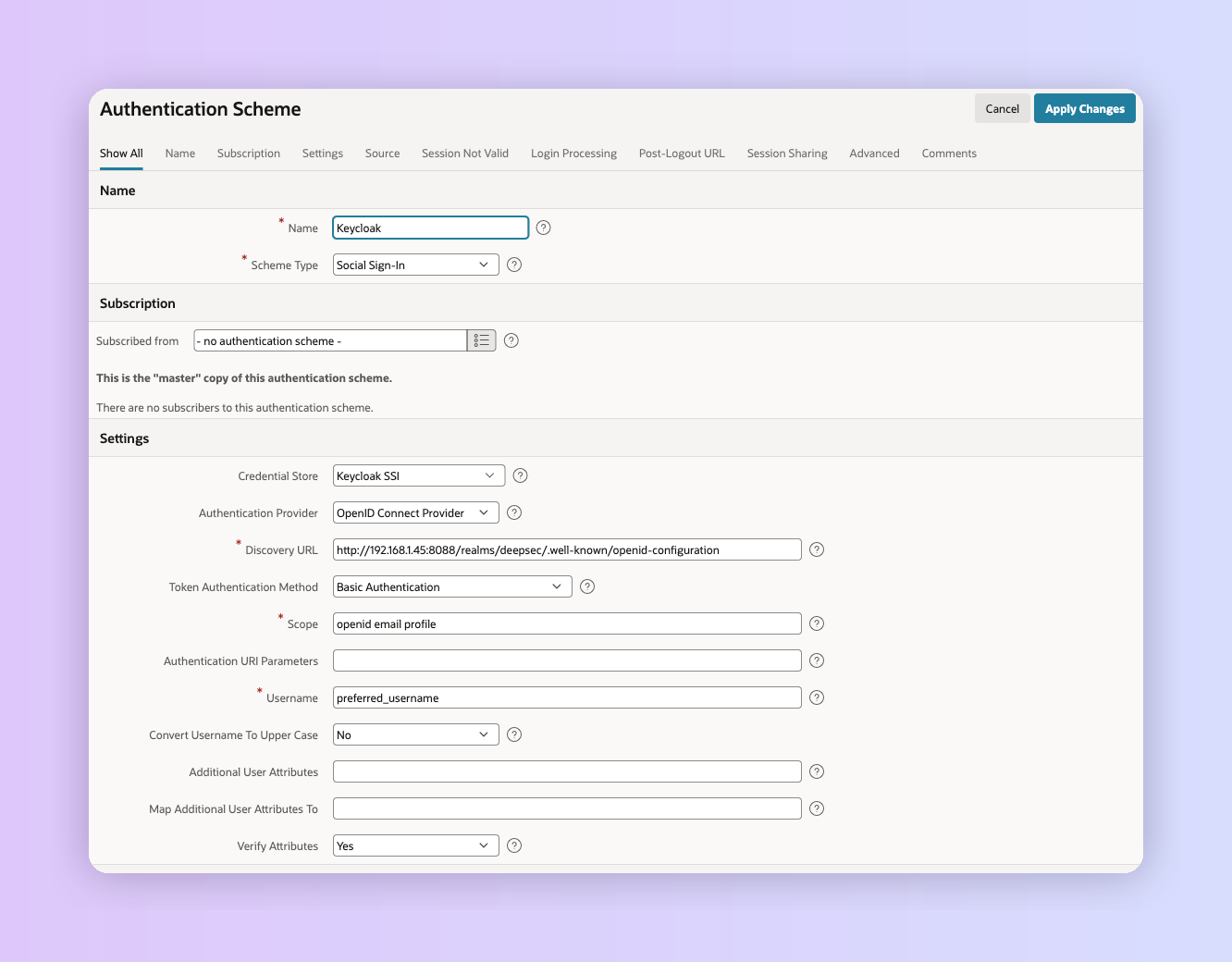
Make that the current scheme, and sign-in works end to end - but the database still isn't enforcing anything. The last step you need to turn Deep Data Security on, you'll find the switch in Shared Components → Security Attributes → Authentication
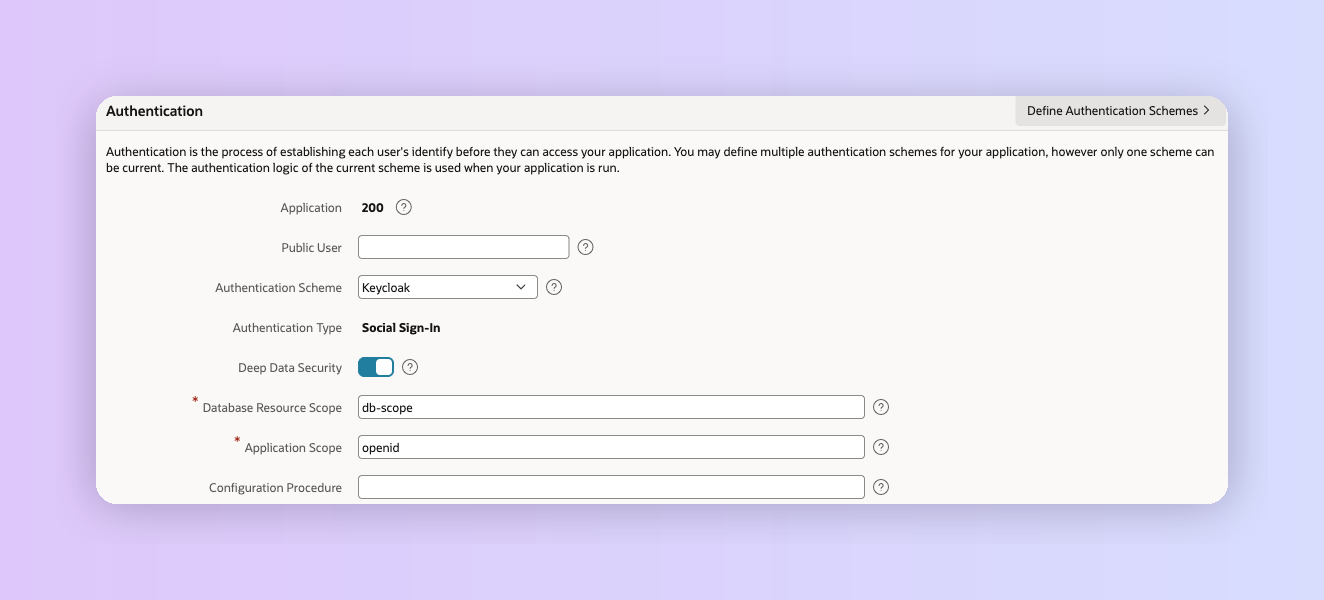
Flipping Deep Data Security on reveals the two extra fields: Database Resource Scope (db-scope - the Keycloak client scope that carries the oracle-db audience) and Application Scope (openid).
BTW If you try this on an application with Custom Authentication you'll see an error
ORA-20987: APEX - Applications using Deep Data Security must use a
Social Sign-In Authentication Scheme.
Deep Data Security only works for an app that signs users in through Social Sign-In, because only then is there a signed token telling the database who the end user really is. A username your app looked up in its own table is no proof of anything. So if you're asking "can I use Deep Data Security with my classic custom-auth app?", the answer is no. But "do I need cloud IAM for it?" is a different question, and as this whole post shows, you can use your own hosted Keycloak server
Going further
A few things worth knowing once the four personas work.
Custom claims - using an attribute from the IdP
Earlier Alice's region came from an onFirstRead handler that looked it up in a table. If the attribute already lives in your identity provider, there's a simpler path: have Keycloak put it straight into the token as a custom claim, and read it with no PL/SQL at all. One protocol mapper on the client copies a user attribute into the access token:
| Mapper setting | Value |
|---|---|
| Mapper type | User Attribute |
| User Attribute | region |
| Token Claim Name | region |
| Claim JSON Type | String |
| Add to access token | on |
If we give Alice the attribute region = EMEA in Keycloak then any claim in the token is then readable under ORA_END_USER_CONTEXT.user.token
select ora_end_user_context.user.token.region from dual;
-- EMEA
So in her rule we can skip the handler and the custom context entirely:
WHERE region = ORA_END_USER_CONTEXT.user.token.region
Now when we login as Alice, that predicate returns exactly her four EMEA rows using the claim the identity provider signed, with no table lookup needed.
So which method is best? Well if the attribute is something the IdP already knows (region, department, clearance), a custom claim is the least code (and centralised if it's used in many different applications). If it lives in your tables or has to be computed then the onFirstRead handler is the best place for it.
One Keycloak wrinkle I found, arbitrary user attributes you create yourself are dropped unless you turn on unmanaged attributes for the realm, or declare the attribute in the User Profile - otherwise the claim just never appears. This caused me a lot of head scratching when I was trying to figure it out.
Asking the database what you're allowed to do
ORA_END_USER_CONTEXT isn't only useful for predicates, you can also select from it to see who the database thinks you are, custom attributes and token claims you have. There are also two useful functions you can use to ask the database what you're allowed to do, which is handy for hiding buttons a user can't use for example
ORA_CHECK_DATA_PRIVILEGE(object, privilege [, column])- can I SELECT/UPDATE this object or column?ORA_IS_COLUMN_AUTHORIZED(column [, privilege])- can I see this column's value in this row?
Gotchas (or things that I spent way too much time on)
A few things either didn't work as I initially thought they should, or I just didn't understand them properly
IDENTITY_PROVIDER_CONFIGis capped at 255 characters and I kept getting anORA-32021. I tried an obvious fix with splitting the value across comma-separated quoted strings but that seems to corrupt the JSON, because the parameter is list-typed and Oracle re-joins the pieces with,. So keep the JSON under 255 characters by leaning on the optional-claim defaults (unique_id_claimdefaults tosub,roles_claimtoroles).- For Keycloak, set
application_id_claimtoazp, notclient_id. Keycloak omitsclient_idfrom the user token, so asking for it givesORA-52602: ... Token does not have application client IDand no rows. Whereasazp(authorized party) is always present. - The end-user context needs a TLS (TCPS) connection to the database, the payload won't travel over plain TCP.
- Custom contexts need a read grant. If a grant predicate reads a custom context, the end user's data role needs
SELECTonSYS.END_USER_CONTEXT, or you'll hitORA-01031. - Keycloak drops custom user attributes by default. A custom
regionattribute you set on a user vanishes unless you enable unmanaged attributes on the realm's User Profile. Nothing errors - the claim just isn't in the token and I spent WAY too long on this one.
What's next
Oracle Deep Data security is extremely powerful, there's still a few things I'd like to investigate. I do have some wishlist items though -
- I hope there's a PL/SQL API coming that makes it easier to integrate with APEX applications that use custom authentication. Yes I know there's an argument that you're removing an element of security since you bypass the IdP, however there are lots of APEX apps out there using their own custom auth that don't use an IdP that could really benefit from Deep Data Security (although there are other ways to achieve similar results such as using VPD etc)
- It's kind of odd that using bind variables in the PL/SQL callback isn't possible according to the documentation (although as you see there are ways around it).
About the author
- Founder of ETCH Labs, Oracle APEX Expert and published Author
Comments
Join the discussionNo comments yet. Be the first to comment.